Easy Kindergarten IT Infrastructure and Web Site

This year with my oldest boy starting Kindergarten I was keen to get involved. The Kindergarten is a Community and Parent run organization via a committee and a new role was created this year for IT Coordinator. That fit perfectly. The role was undefined, but basically any IT need would come to me rather than the previous process of asking a Dad familiar with "Computers" to help out or give purchasing advice. As you can imagine then, as I’m sure with many small non-profit community organizations, the systems and processes can gain some great improvement with just a bit of continuity.

First task is always to listen to the issues people are having with the current environment. These are often things that are just blocking or frustrating normal computer experiences. In this case, printer problems and Wi-Fi signal strength. The solutions to these things are usually quite simple to those in the know, but worlds away from people who just need things to work.

Secondly, a personal email accounts for the teachers @<kindy>.com is something that they hoped they could get, but never had anyone who knew how to do it. The current office email address is the ISP given email account. I put a new web site on the agenda with this to give a whole new online experience. The existing site was the second iteration done by a Dad one year giving his time to help out. The web site content had been updated once in two years. Hosting has been graciously provided by the son of one of the teachers for several years. My goal was to provide a web site that was a modern useful communication channel for the teachers and current parents. The previous sites where just a web presence with an about, contact and enrolment details.

Printers and Wi-Fi

Tracking down the details to get these things done, like the Wi-Fi connection details, hosting sites and accounts, web site accounts, and Internet provider details is a difficult task. Anything thought important was kept in a single IT folder. One task that I am yet to complete is to throw out all the existing information, which had history, not just current, and replace it with a clear guide to how everything is, now that I have deciphered it and documented it in OneNote.

Solution to the printers was tied up in the Wi-Fi as it was a wireless printer. The signal strength into the classrooms was poor due to the Internet connection coming into the office and the Wi-Fi access point being set up there. Fortunately the building has a small room between the two classrooms, closer to the office that has just over 50% signal strength. Plugging in a Netgear WN2000RPT Universal Wi-Fi Range Extender gave a strong signal into the two classrooms, one which had absolutely none previously. This allowed the teachers to be able to have their laptops in their classroom online, making more useful personal email accounts to allow direct parent interactions, rather than the shared computer and inbox in the office.

Email Accounts

Email accounts for domain names are usually provided by the hosting provider. And in this case that was the same, however, it is not a path I would recommend at all. The web mail clients are usually very poor, especially by today’s standards, and there is usually very low data allowance. The solution is Windows Live Admin Center – Custom Domains. As the description on the site says "If you manage a domain for the neighborhood Little League or the photography club, you can personalize Windows Live for your group.". The process is very easy. Just click on Get Started, fill in your Domain Name and Set your MX records though you DNS provider as shown in the setup.
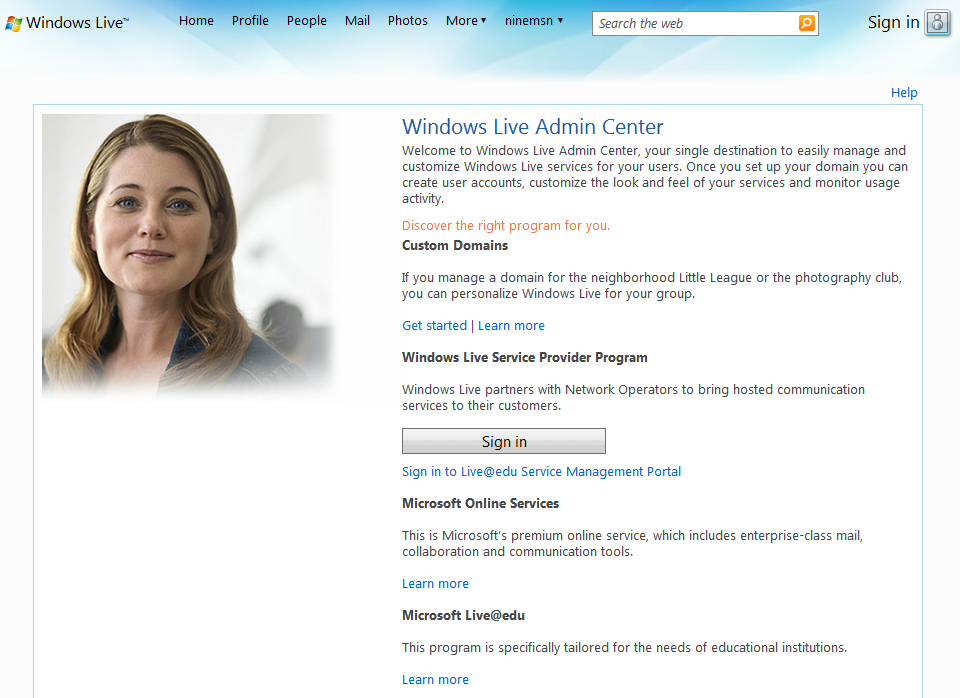
Windows Live Domains

MX Records

User management is then done via the settings in Member Accounts. You can create up to 500 accounts in your domain; far more than the typical 5 for a low cost hosting provider. However, not that many were required for the Kindy.
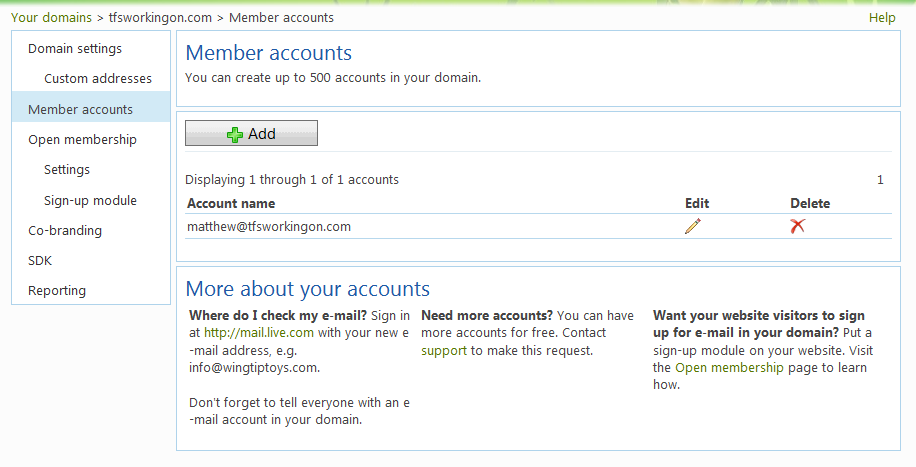
Member Accounts

Custom Url’s to access other Windows Live services such as Mail and SkyDrive can be configured. This makes the whole experience for your users seamless, while letting Microsoft take care of the infrastructure.
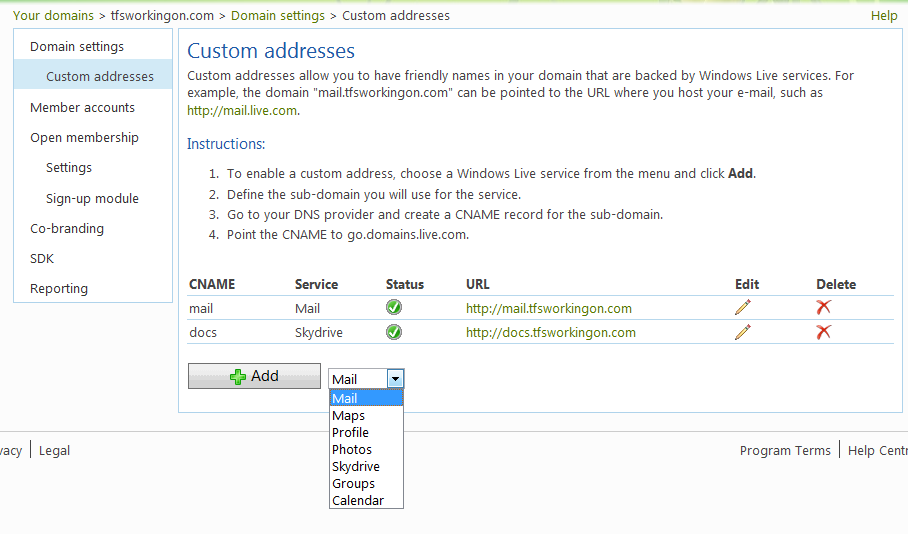
Custom Adresses

You can also drop your logo into the page, albeit very small.
Mail Logo

Web Site

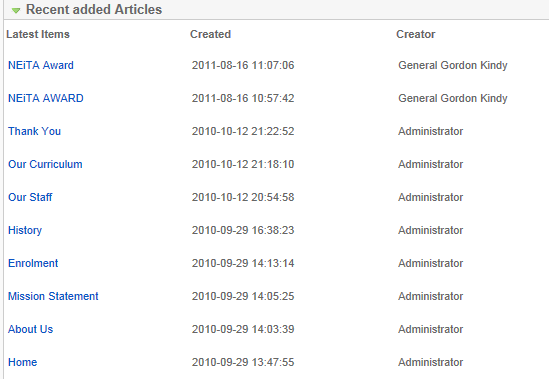
Creating web site for the Kindergarten is a little more difficult, but not much. I began with looking at the existing site usage to see the current main use of it. Clearly, as can be seen below, it was just used for enrolment information and secondary finding out about the Staff. Also updating of the site was too difficult for the staff since after the setup in Sept-Oct 2010 the site was only modified once in August 2011.
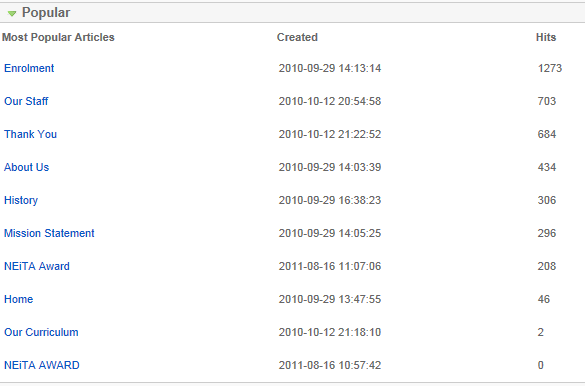
Page Hits

Update Log

It was built using Joomla 1.5 and looked quite dated.
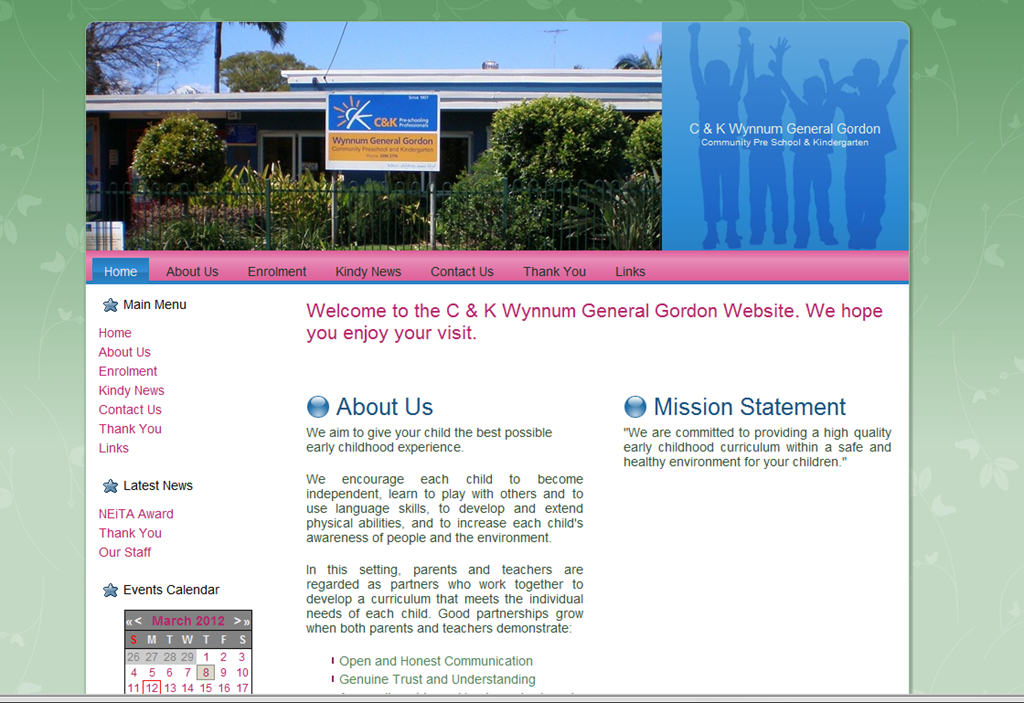
Existing Joomla Web Site

When creating a new site like this needs to be as simple as possible for the staff to be able to own or subsequent committee members to take up. As I stated, I wanted the site to be useful for the current parents. There is a lot of communication that goes on between parents and the Kindy. They is always multiple notes and letters going home with parents at pick up and drop off and a monthly newsletter. This left no shortage of information that could be provided on the web site as a "single point of truth" for parents about all that is going on and have a clear view without having to scrimmage through the loads of paper picked up. Not to mention just the ease of losing one critical piece of paper due to the turmoil of picking up the 3 year old with a 2 year old and 6 month old that also want to stay and play. Choice came fairly quickly to rely on WordPress for several reasons:

  • Super simple to configure
  • Simple for staff or committee members to update, and plenty of help available online
  • Plugins for anything, so no coding required
  • Themes galore
  • Hosting by many providers, including WordPress.com
  • Quick preview created on my local machine with Microsoft’s Web Platform Installer

With this, each new piece of information required to go to parents can be put up as a new post. All event information is in the calendar and up to date. I was able to create a mock up in about an hour. I then exposed this instance on my machine to the Staff and Committee so that it could be previewed and feedback given before going live.
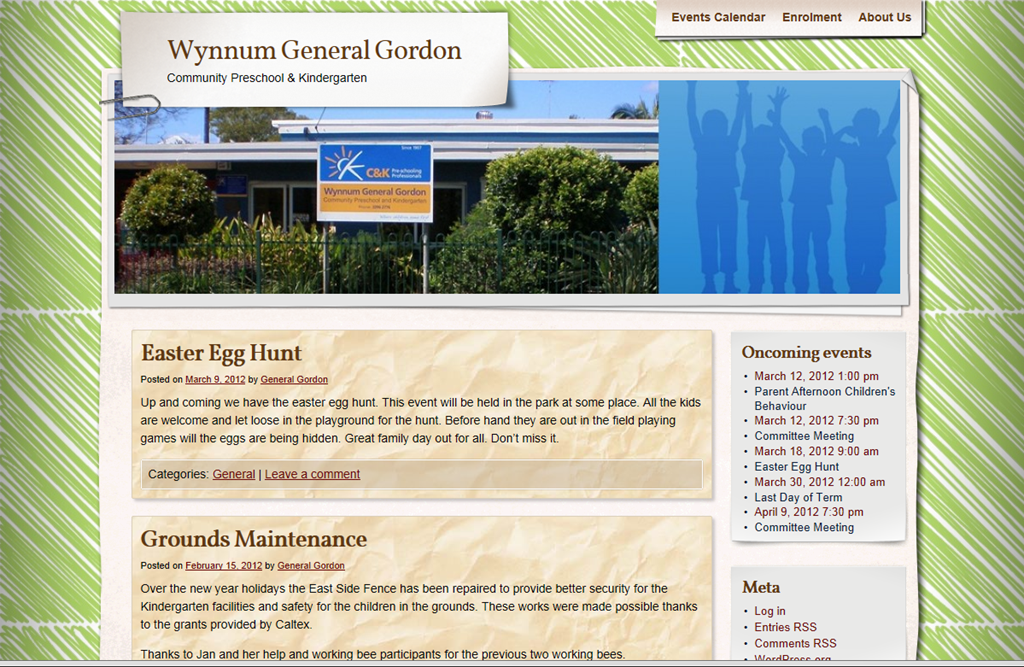
Quick Preview Web Site

Two main pieces of feedback that came up was privacy and director discretion. Creating a login for each parent is undesirable and impractical. The site needs to be low maintenance. Fortunately WordPress has a Protected Post feature. Just set a password for the post and that post is then locked. This gives us a good balance to allow some posts to be public, which is easier to use and gives prospective parents and feeling for how the Kindy works and enough privacy for security of our children. For the director discretion to review anything posted, at the moment only I am making the posts and have a login. WordPress however providers the ability to allow only drafts to be published by some users which would allow the review process, if more people become keen on posting themselves.

After a few more hours picking the best plugins and tweaking the theme with the background provided by another committee member the new site was approved and uploaded. The plugins I went with were:

  • All-in-One Event Calendar
  • Contact Form 7
  • Image Widget
  • Simple Slideshow
  • WordPress Importer (for transferring from my computer to the host server)

And the base theme was Adventure Journal by Contexture International.
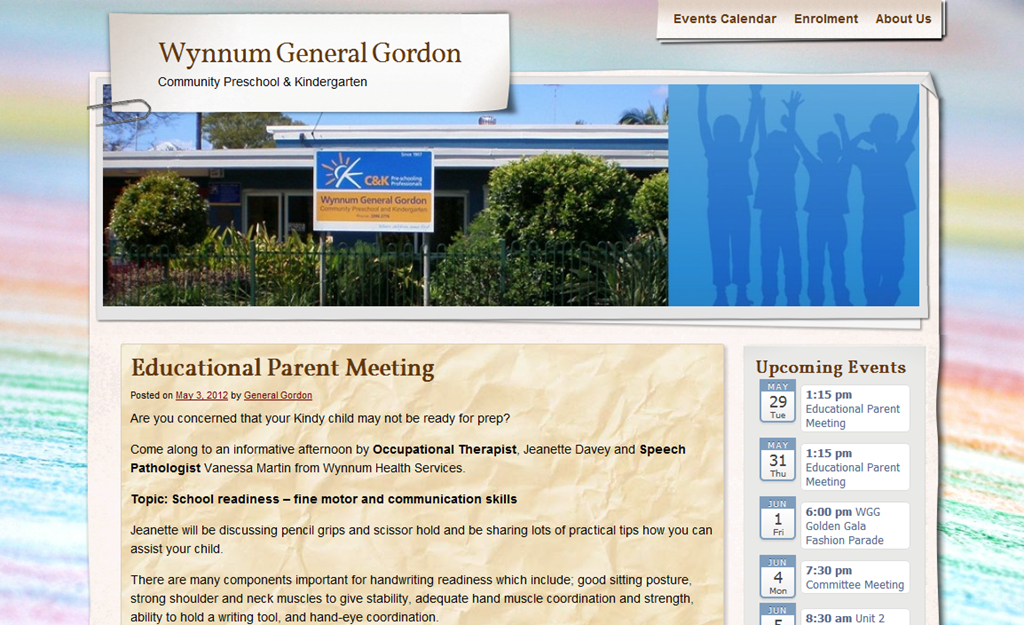
Final Web Site

There are a few outstanding items to do, but quite low priority as to getting the site live. These are:

  • Mobile Site friendly (this can be done with a plugin)
  • Details for the staff profiles
  • Move DNS hosting to an account controlled own by the Kindy
  • Move hosting to WordPress premium
  • Document Posting and Calendar updating process
  • Minor outstanding style tweaks
  • Documents online in a shared SkyDrive account

For now I am maintaining and publishing all the posts to the site. But as the staff get use to the new things introduced I will slowly hand more over. For new posts the staff can now just email what they want posted (usually a Word document that would be given to parents) from their new personal email accounts.

Publish Apps and Get a Nokia Lumia

I had been wanting to create Windows Phone apps for about 6 months now but had been continuing to put it off. When Dave Glover announced the challenge, it was the kick I needed. Publish 3 or 4 apps and receive a Nokia Lumia 710 or 800. Working almost every night, from early January, this is what I achieved:

Memory Speed

This is NOT a standard game of Memory. Once a pair is matched, it will flip back over if you do not find all the others quick enough. This game comes complete with 3 difficulty levels with up to 21 pairs to match. You must match all pairs within the Matched Pair Timeout. If a matched pair flips back over you can simply match it again, and it will be another matched pair timeout interval for that pair. If you are not quick enough, you’ll end up spending all your time rematching pairs you have already found. Game high scores and statistics are recorded to ensure you always have a goal to beat.

1 of 5 2 of 5 3 of 5

Maths Defender

There are incoming bombs falling towards the city. The only way to stop them destroying the buildings is to denote them with the code. The code is the answer to a maths equation. This game comes complete with individual operator (+, -, x, ÷) or all options, adjustable number range from 0 to 100 and 3 speed settings to challenge everyone

1 of 6 2 of 6 5 of 6

Count With Me

Keep the little ones entertained while they learn to count. Tap each object to highlight the numbers as you count. Select the right number and they objects will fly off as the count goes up. It features many different objects from robots to trees to cars and bright varying backgrounds.

1 of 6 2 of 6 6 of 6

Color Bubble

Help the kids learn their colors by popping bubbles. The player is given a colored instruction of which color bubble to pop. The bubbles then bounce around while they try and pop only the specified color. If they hit the wrong color it just bounces the bubble around more.

1 of 5 2 of 5  3 of 5

I wanted applications that would engage the brain in some way. I’ve never been interested in writing games and never done it before, but taking the approach for educational games that will be also entertaining for my three boys (3, 2 and 1/2) became very fun. I would draw the concept on the white board and then my eldest boy would watch as the development progressed and the game came to life. And he really enjoyed them.

Having developed back in 2004 for the Pocket PC I wanted to see how far the development tools had come. I thought they were really good back then and what I have found is that the experience is even more seamless. Considering I have now published 4 apps on the store without ever running them on a physical device should give a good testament to the development environment. Not to mention 4 games in a few hours a night over 2 months, never having done games development before. A far cry from my first horrible experience in 2008 in the Android Development environment. However, I assume it has progressed and would now love to port these apps over to it now.

Unfortunately, my last app was published on the 04/03/2012, two thirds through the competition and by half way through the limit of 50 entries had already been received. So I missed out on a phone. A big thank you to Dave Glover for organizing the challenge and really engaging the Australia development community. So much so that he currently has another competition running for the most download app. Unfortunately, I’m fresh out of ideas, especially ones that would appeal to the masses of Windows Phone users. Although, I still do need a Windows Phone to be able to have my boys play them whenever we are out, and they need to be distracted.

Failure of Search TFS

Well over a year ago I set up a landing page to start gathering emails for interest in Search TFS. A dynamic integrated TFS work item search experience. Today I am calling an end to the project. Although the project didn’t go anywhere, by the process I followed I wasted little time and could fully justify the position the product was to take. The main reason to kill it is that Visual Studio 11 is shipping with integrated TFS work item searching. Finally.

Team Explorer VS11 Search

I think this helps justify that there is a need for what I wanted to do. The existing Search Work Items for TFS 2010 had 7,076 downloads on the 1st January 2011 when I was starting this and now has, 23,093. That’s not a bad niche. How many would be willing to pay for something better is another question. On my landing page, I got 12 emails. Considering that there was absolutely no push, SEO, linking (apart from this blog) or advertising I’m happy there was something and I have a baseline.

Soon after I launched the landing page I got wind the Microsoft was finally going to do something. So I waited to see. Now that I’ve been playing with Visual Studio 11, I’m happy with the new Team Explorer for the most part, but I was quite disappointed with the search. It’s no better that the current available plug-in. That means it’s slow and query based. I wanted more like OneNote, where you see results as you start typing:

OneNote Search

The market though, even for something substantially better I feel is drastically reduced now that it is first party. I’m disappointed Microsoft didn’t do better since search is one of the most important features of work item tracking. The way that UserVoice does it to help prevent duplicates is brilliant. I’m hoping the search works better with TFS 11 but  since running it against Team Foundation Services (fantastic btw, especially the just announce build service) I have little hope for that.

All is not lost. TFS Working On has improved in its download rate. ClickOnce deployment having less friction may have helped that. It’s long overdue for an overhaul. I’ve had plans for nice Windows 7 integration for a long time, now I should be looking at Windows 8 perhaps. Search TFS will still fit nicely into TFS Working On, especially for those that don’t live in Visual Studio.

TFS Working On – Version 1.3 Released

This release of TFS Working On includes is mostly just about TFS 2010 native support but includes some minor things that were annoyingly missing from the previous version.

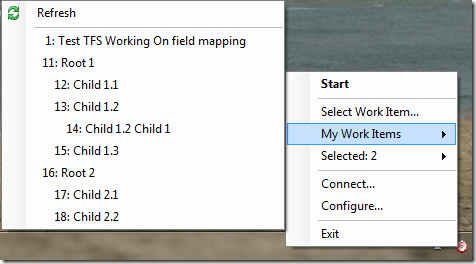
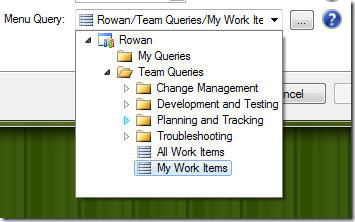
Firstly, native TFS 2010 support. This means no need to install Team Explorer 2008 and the forward compatibility update. Unfortunately you still need Team Explorer 2010 since Microsoft has not released TFS API redistributables, as far as I know. Some of the nice things that come with TFS 2010 support hierarchical queries in the context menu and native query picker for the menu query.

Hierarchical Menu Query

Query picker

ClickOnce deployment is now used. The intent it too easily allow users to know if updates are available, since I have such a sporadic release timeline. Note that you will need to manually uninstall the previous version. In theory the two should coexist. I haven’t tried it and I don’t recommend it. Having the two would just become confusing. The installer is still available if that’s your cup-of-tea.

I would like to thank some volunteers that helped with this release contributing to the project. It is great to know it is not just my work team using TFS Working On and others are finding the tool useful and a great time saver.

Here is the simple everyday improvements made that should alleviate users:

  • Refresh option in the Menu Query
  • Rounding time tracked to 2 decimal places
  • Right-click context menu to allow viewing working items from the search results
  • Prompt for estimate if none set
  • Esc key dismisses Select Work Item dialog
  • Work Item mappings stored in version control
  • For more details see the Documentation.

As usual a bunch of bugs fixes included:

ID

Title

7029

Unhandled exception viewing current working on work item when connection to server is lost

7348

Permissions on shared configuration file

7349

Move format of workitem history update entry to configuration

11630

TFS 2010 hierarchical query in context menu exception

11671

Menu Query exception when Query no longer exists

11948

Duration, remaining and elapsed time fields don’t get updated if no mappings are defined for the first team project in "Connect…" list

13172

Switching connections causes error in FormSearchWorkItems with TFS 2010 upgrade

13174

Mappings Path no longer working with TFS 2010 upgrade

13175

Query List no longer working with TFS 2010 direct connection upgrade

13288

Default Mappings path fails due to folder not existing

13457

Last item in query menu does not work if at bottom of screen

Technorati Tags:

Visual Studio Minimalist Toolbar

Although for most functions in Visual Studio, I use shortcut keys, a couple of buttons for when you are already on the mouse is very handy. Visual Studio however has multiple toolbars and a load of buttons that, for the most part, just take up valuable screen real estate. Even on my new triple 22” wide screen setup.

The question of using the Ribbon in Visual Studio was raised on the new Visual Studio UserVoice feedback forums. I personally gave this three votes, but I am also in favour of as little toolbars as possible. So I added the comment:

The Ribbon done right would have a customizable quick access toolbar which would include the Debug button and your other frequent ones there. And as with the Office Ribbons you can collapse it to just the tabs, so in effect, you can have more screen real estate all the time while still accessing any functions you want with, at most, two clicks. Much better than continually showing and hiding the relevant toolbars. However, Visual Studio currently lets you put toolbar buttons right up in the menu row, which is where I have my common buttons and can remove any other toolbar.

That would give you something like this, as I have in Windows Live Writer:

Windows Live Writer Ribbon - Customizable and Collapsed

However, I just want to elaborate what I meant by buttons in the menu bar, as my colleagues didn’t know you could do it either.

  1. Right-click any where on the toolbars and click Customize…
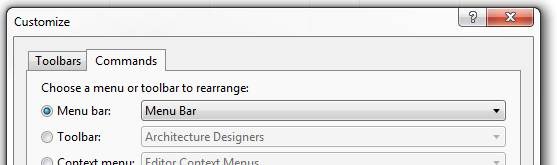
  2. Select the Commands tab
    Commands Tab
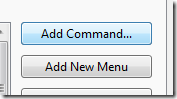
  3. Menu Bar is already selected, so click, Add Command…
    Add Command...
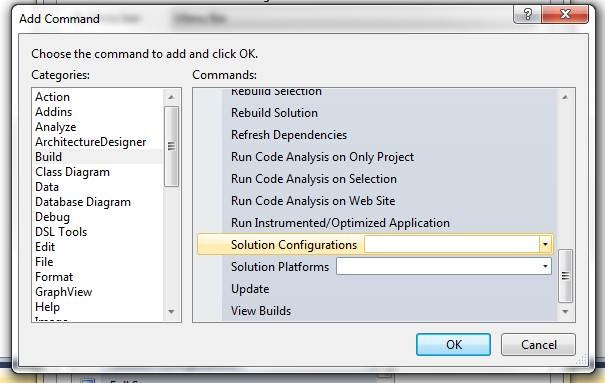
  4. Select the command you want
    Add Command Dialog
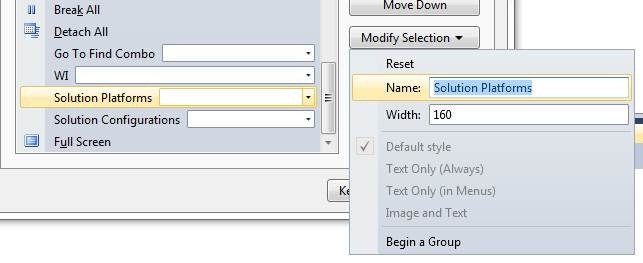
  5. Position and Customize it’s details
    Customize Item

And here is the result:

Visual Studio Minimal toolbar

Debug Lambda Expressions

Although I think the Ribbon would clean things up nicely and allow everyone easy minimal toolbars with the quick access, better function and shortcut key discovery, as seen above, it is already quite customizable. With that in mind I think the time would be much better spent getting the debugger able to evaluate Lambda expressions. Time and time again, I am stopped because I cannot evaluate a simple .Select(x =>x == y). Whether this is in the code you have written, or just something you want to write in the quick watch or immediate window to determine the contents of something quickly. I raised this suggestion:

Debug Lambda expressions

Allow Quick Watch and other Debug functions to work with Lambda expressions.

"Expression cannot contain lambda expressions" makes this powerful language feature second-class within the IDE.

Especially for data intensive applications being able to write Lambda expressions in the Quick Watch, Watch, Immediate Windows and debug evaluation is a must have.

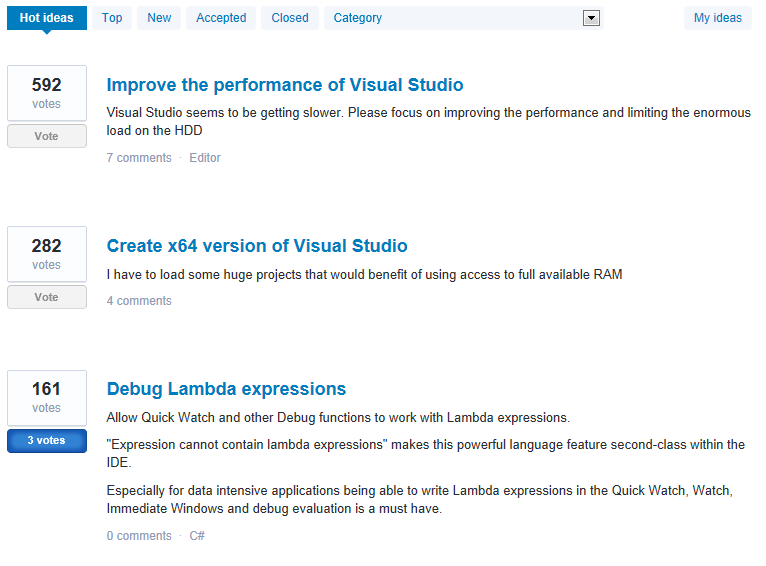
Which I am pleased to say has got to the top 3 on the Hottest Ideas. So please vote on it.

Debug Lambda expressions - 3rd Hottest Idea

Technorati Tags:

Getting things done Moonlighting

I’m married with 2 boys, a 2½ year old and a 9 month old. As you can imagine this leaves very little time to do projects on the side if I also want to be a good father and husband (which to me is far higher priority). Whenever I do get a chance to work on my side projects, I have to be as effective as possible each time. Here are a few guidelines I use to help me complete my products.

  • Strictly define your task
    Each time I get to my computer for what is usually between 1 and 3 hour blocks I need to ensure I aim to complete a specific task in that time. Obviously not much can be done in such sort blocks, but even if you only get 20 minutes, try and define a task that can be completed in that time. It may be simply a single function. It may be outlining and estimating tasks for later.
  • Make sure everything you are doing is on task
    Everything you do, you need to ask yourself, “is this going to help me do my task right now?”. If the answer is no drop it. In such short blocks and when they come sporadically it is very difficult to keep multiple things going at once. It takes a longer time to pick up from where you left off and that leaves you less time to get things done. Sticking to just the task at hand and completing helps you see real progress on your project which helps with motivation.
  • Do things once
    You should always aim to do a task and move on. Do it quickly, and mostly correctly. This is a hard one, because every developer loves to mull over code and make sure it is perfect, optimized, generic, reusable and solve every problem you may encounter. This one requires a very good balance of ensuring progress while ensuring the really important aspects such as good architecture and well tested while ensuring you are coding for the problem at hand, not one that may be.
  • Learn only what you need to know
    Do not over analyse possible solutions or completely learn new frameworks that you might need. Certainly be diligent, but if you find something that works that is not obviously bad, go with it and stick with it until you learn otherwise. Even if you later learn that there is a better way to do that task, do not redo it unless it is causing an issue (see above Do things once).
  • Set yourself Deadlines
    Even if you have no one waiting on you, and your schedule is yours to decide (or worse, not decide), you still need to have reasonable targets and really aim to hit them. This helps you cut any tasks that aren’t going to get you to that goal. This will give you only the important tasks and help you progress faster. You do not want to feel you are stagnant on a never ending project.
  • Get out version 1.0
    1.0 is something to be proud of but by no means is it your complete vision for the product. Getting it out quickly helps you get vital feedback from you users and can help direct your tasks to what people want. This something need to be done carefully since if you have a big launch and get lots of people to try it out and version 1.0 is buggy and incomplete, they may be reluctant to try again. You should aim for minimal features to do the primary task and well tested. Be open with the users so that they can see more is coming and that you are open and responsive to feedback.

This should result in just enough software with little-to-no waste. If you want to really see how extreme you can successfully go, check out 37 SignalsGetting Real book.

Setting up a landing page

Following on with Rob’s post I have completed his very practical guidance:

1. Buy a domain name and point it to your web host
2. Setup a landing page. Keep your copy really short (and punchy). You need to pique interest, not convince them to buy.
3. Collect emails on that landing page

As stated in my last post I had already setup my domain name and hosting with GoDaddy. This took me around 90 minutes researching plans and checking domain names. I think this took too long, as I fell into my habitual analysis paralysis. I ended up spending only $50.05:

  • Hosting – Grid – Economy – Windows – AP Region – 1 year (recurring) $47.88
  • .COM Domain Name Registration – 1 year (recurring) $2.17

For that little, it was not worth the time I spent weighing it all up. I kept looking at the Deluxe account which allow a lot more, for not much more. The multi-year lock-ins for much larger discounts were also tempting, but I think there is more merit in making a quick decision with these little things. Something I’m working on.

Next was to install WordPress. This was very easy with GoDaddy and all provided free under the hosting plan. Personally I do not particularly like the LaunchPad theme. Whether it matters or not I do not know. I ended up finding the theme Ice Breaker which I preferred. This was another step that I wasted too much time on. However, both of them next time will be very quick.

Setting up a MailChimp account was very quick and painless. I had to leave a few things going at once though, because I didn’t have the email account setup first. Doing that with GoDaddy again was very easy and provided free with my domain name registration. Just something I should have done first. As I had my Twitter sign up sitting there waiting for the email account to activate also.

Once email, MailChimp and Twitter were setup I could then modify the Ice Breaker theme in WordPress. I’m still new to WordPress, but finding where to do this was easy enough. The difficultly I had was modify the page to submit the email address to MailChimp instead of FeedBurner as it was setup by default to do. In MailChimp get the code for the embedded form and strip all elements and styles from it. You can then add the required Divs and Ids as required to submit to MailChimp.

From the landing page I have left the RSS feed available. This by default, will link to the default word press Hello World! post. Deleting the post resulted in an error from the RSS feed. Instead I changed that post to say a similar message to my landing page, in case anyone subscribes to the feed. Time spent: 2 hours 45 minutes.

Including getting hosting I’m now up to 4 hours 15 minutes. It adds up quick. Going forward I’m going to enter all my work items into TFS and use TFS Working On to track my time. In this blog I will continue to detail time and money spent (and received hopefully) and other difficulties or unexpected things that may arise. But for now here is my landing page for Search TFS. Please sign up if you are interested and I will also update how many email address I get. I do not think my text is quite punchy and I might update it later, but now I’m off to do some coding.

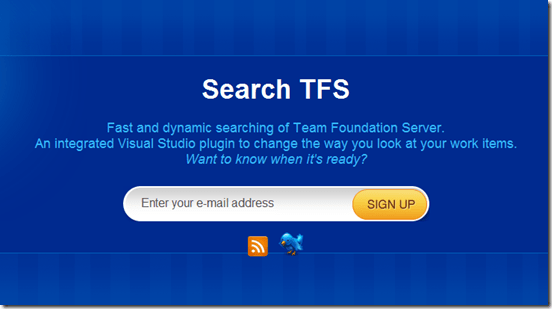
Search TFS landing page


Technorati Tags: ,

Hello WordPress

I have now completed the move to WordPress from Windows Live Spaces. It was a good kick to be given and I am already enjoying the great statistics provided by WordPress. I do still want to adjust the Theme and get to know more of the way WordPress works but there are higher priority things I am interested in.

I am really motivated at the moment by Software by Rob to get going with my own software products. Anyone wishing to write their own software this is a must read. Rob freely shares his start-up and marketing experiences that are invaluable. So following Why you should start Marketing the day you start coding I have bought a domain name and some hosting and activated it last night. In the next week I plan to put up my Landing Page. I will be detailing here how things are going along the way for my personal log and anyone who is interested. This will be my first time trying to sell a product after two "successful" free products, TFS Working On and Bluetooth Auto Lock Gadget. I have no idea how well I will be able to sell it, but once I have a little more information I will be setting small financial and user targets. This project won’t be so much about making money but more on the experience. I want to understand what is involved first hand. It is a product in a domain I am very comfortable with and will help me out regardless if anyone else finds it worthwhile.

The product, Search TFS.


TFS Working On – Version 1.2 Released

I have finally released TFS Working On 1.2. You can download it from here. It includes basic support for TFS 2010 with Team Explorer 2008 Forward Compatibility update installed and the following features:

Menu Query list

You can select an existing TFS query from the configuration pages to use a quick start list accessible from the TFS Working On menu. This removes the need to search for work items, and you can just pick them off your list.

Note: TFS 2010 Hierarchical Queries are not yet supported.

Prompt on resume

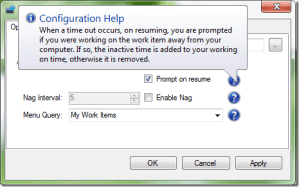
When you are away from your computer and TFS Working On automatically pauses monitoring, you can enable the option to be prompted on resume. You are given the option to Record the time away, for the instances when you were working on the work item, just not on the computer, like in a meeting or discussion with a colleague. Resume working, time away is not recorded, like going out for lunch, and coming back to continue. Or Stop, time away is not recorded and you do not resume working on the selected work item.

Cancel Currently Working On

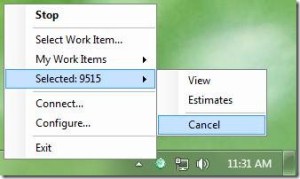
You can now cancel your current working on, preventing any time being recorded against the work item.

Work Item Title Tooltip and Notification

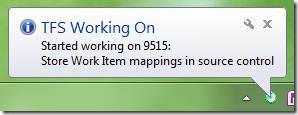
The title of your current work item is now displayed in the balloon notification and the TFS Working On notification tray icon tooltip.

Data Warehouse Processing (TFS 2008 only)

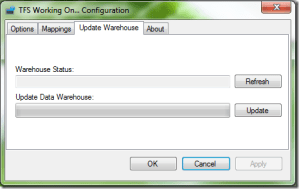
TFS Working On allows updating of the Data Warehouse and TFS Analysis Service cube on from the Configuration pages. This forces an update without the need to remote onto the TFS Server or wait for the scheduled time. Useful when you need to ensure you Warehouse data accurately reflects the current Work Item data when generating a report to distribute.

Existing Raised Bugs Fixed

ID

Title

6707

ItemUpdatedOnServer error selected work item from search results

7006

Time not logged if you shut computer down

7357

WorkingOn – Configuration File Save – crash

Version 1.3

I can now begin work on the next version. I have the goals outlined here which are currently just native TFS 2010 support and Windows 7 Integration. I have begun organizing the work item list to prioritize new features. I have you preferences please raise a work item and vote for features you want done first.

I would like to thank Patrick Smacchia from NDepend who have graciously sponsored TFS Working On with a professional license. NDepend is a static analyzer 100% integrated in VS that simplifies managing complex .NET code base and achieve high code quality. This analysis will highlight to me clearly the dependencies relationships I have in the TFS Working On and enable to correct it much easier. I already know I have violated the Single Responsibility Principle greatly to get it out the door in time for the first release, now I have the best tool around to help me fix it. Below is an image of the dependencies from NDepend.

Technorati Tags: ,

TFS 2010 Upgrade

Recently I took the opportunity, safely between product releases, to upgrade our TFS 2008 server to TFS 2010. I performed a Migration Upgrade to new virtual servers. I have a server for each tier, Application, SQL Database, Analysis Server, Reporting Server and Build Server. Overall the upgrade was very smooth and error free. Very impressive work done by Microsoft to get this complex operation simplified. I had absolutely no issues with the version control or work items, so downtime for my team was very minimal once they installed the forward compatibility update. I did however have some issues, which I will outline and the solutions I found.

Backing up our existing TFS databases, transferring them across our (slow) network and restoring them on the new SQL Server, was the longest task. The actual upgrade by the TFS 2010 administration of the TFS 2008 database (about 25GB) took around an hour. Not bad.

The data warehouse did not update right away. I had to manually trigger a rebuild. Using the cube afterwards we found it was not fully populated. This was very odd and gave the first use experience of the new cube a very bad impressive. Over the week however, I was monitoring the warehouse views and database size and saw this steadily increase until all the data was in there. We have our own BI Reporting tool, so all our existing reports were completely broken due to the cube schema changes. The jury is still out whether the cube is easier to use or not, but we are now powering away rebuilding all our reports.

Most of the pain was getting the new build server up and running. This is partly due just to getting our prerequisites in order, but there were a few issues from Team Build 2010 itself, since we were not upgrading to Visual Studio 2010 just yet (we will soon).

Firstly, MSBuild 4 failed to detect dependencies. This caused the projects in the solutions to build out of order, and subsequently fail. The solution is to update the dependencies manually in the solution file and the fix is found here.

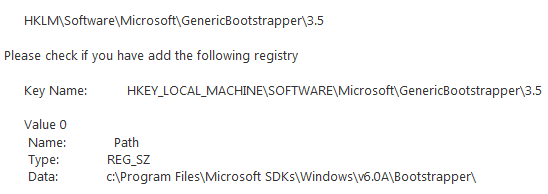
Secondly, it failed to find the Bootstrapper SDK path. A reinstall of the Windows SDK may have helped this, but the easy solution is to just edit the registry and add the path. Solution found here and here.

Thirdly, and most painfully, and still not resolved is that the Test Results are not published and the error message is TF270015: ‘MSTest.exe’ returned an unexpected exit code. Expected ‘0’; actual ‘1’. This means that they are not available from the build details, the drop folder or the cube. I can only see the test results by looking through the text MSBuild log file. This issue has been resolved but the fix is not yet available. I assume it will only be available after we have moved to VS 2010 anyway which does do much better management of Unit Tests by removing the need for the horrible vsmdi.

Lastly, we still get numerous TFS237086: The work item cannot be saved because at least one field contains a value that is not allowed. I do not know why we get this message sometimes especially since the work item number quoted has been updated and associated with the build and there is no invalid state of it. One theory is that multiple builds are updating the same work items and the build does not refresh the work item just before it updates it.

The Reports node in Team Explorer had a red cross on it and I was eager to see the new reports. I found that the new instance of Reporting Services did not have the correct permissions for the users. Fixing that and the Team Explorer reports node came good and the old TFS 2008 reports all worked against the new data warehouse and cube. Nice. The new reports however, were not there. Importing them from the exported CMMI Process Template did not map them to the data sources correctly. Manually fixing that got them working, but I imported them to the wrong folder structure, so the links did not work. Later I found this page which outlines a process to import the new reports. I am most interested in the Excel reports, but I have not connected to SharePoint yet, since I will wait till we upgrade it to SharePoint 2010, so I was quite disappointed I could not get them without SharePoint. We use our own reporting tool anyway, so this was more for interest and replicating the Reporting services reports in our BI tool from the Cube was very easy.

Once the builds were working I set off to enable the Test Case Management which is a big reason for us to upgrade to get started with right away. Following the instructions here was easy although there were errors, but the user comments are helpful getting around them. I had already quite heavily customized our work item layout so I did not have to follow many of those modifications. It was a very simple task with just these steps:

  1. Download the Process Template
  2. Import Link Types (Shared Steps and Tested By)
  3. Import the Work Item Types (Test Case and Shared Steps)
  4. Import Categories
  5. Modifying the Bug template, just to add a couple of fields. I did not modify my layouts.
  6. Specify the Bug Type to and bugfieldmappings for Test Manager
  7. Grant permissions

I did this for two projects and the second time was very quick. There were however issues at step 3, 5 and 6. Firstly, step 3. The downloaded work item template has the new Names for existing Fields. This caused the error TF212018: Work item tracking schema validation error: TF26177: The field System.IterationId cannot be renamed from ‘IterationID’ to ‘Iteration ID’. This involved just editing the work item type xml. For me, it was:

TestCase: Area ID –> AreaID
SharedSteps: Area ID –> AreaID; Iteration ID –> IterationID

Second, step 6 which caused me to go back to step 5 later. This was painful! Bug Field Mappings. Contrary to the article and name of Bug MAPPINGS, you cannot specify another field you want the Test Runner to populate. I have tried to get it to use the existing Microsoft.VSTS.CMMI.StepsToReproduce field with no avail. MVP Ed Blankenship has confirmed this, that the values are hard coded! So thirdly, was to go back to step 5. To resolve it I had to:

  1. Add the new ReproSteps field.
  2. Set it to copy StepsToReproduce.
  3. Update all Bugs work items in the project by adding a comment in the history. (Use Excel, the new bulk edit in the web access is slow!)
  4. Edit the form to display ReproSteps where it was StepsToReproduce
  5. Remove the Required on StepsToReproduce and add it to ReproSteps

Now though, the Test Runner populates our Bug templates nicely, and performing these on the second project was quite quick. However, the upgrade could have been much smoother if the mappings worked. It felt like Microsoft had disregarded existing installs in this area. Next steps are now powering ahead with the new test case management, which seems nice, but the Test Management interface is certainly version 1 to put it nicely. Upgrading our projects to Visual Studio 2010 to get more benefits from TFS 2010 with the client designed for it. And plan the next iteration with the hierarchical work items.

Technorati Tags: